
 Information for
 Quick links
 Faculties


1. How do I get my HIZ ID and how does my university login work?
Once your enrolment is complete, you will receive your HIZ ID – and with it, your login details for the university’s systems – in your ID letter/information sheet. Here’s how to access your ID letter/information sheet:
- Log in to the SIM application portal
- Under My Applications, click on the tile for your degree programme
- You can download the letter under Documents
If you have previously been enrolled at Saarland University and are re-enrolling, you simply need to use your old HIZ ID again. If you no longer have this, please contact the HIZ IT Service Desk.
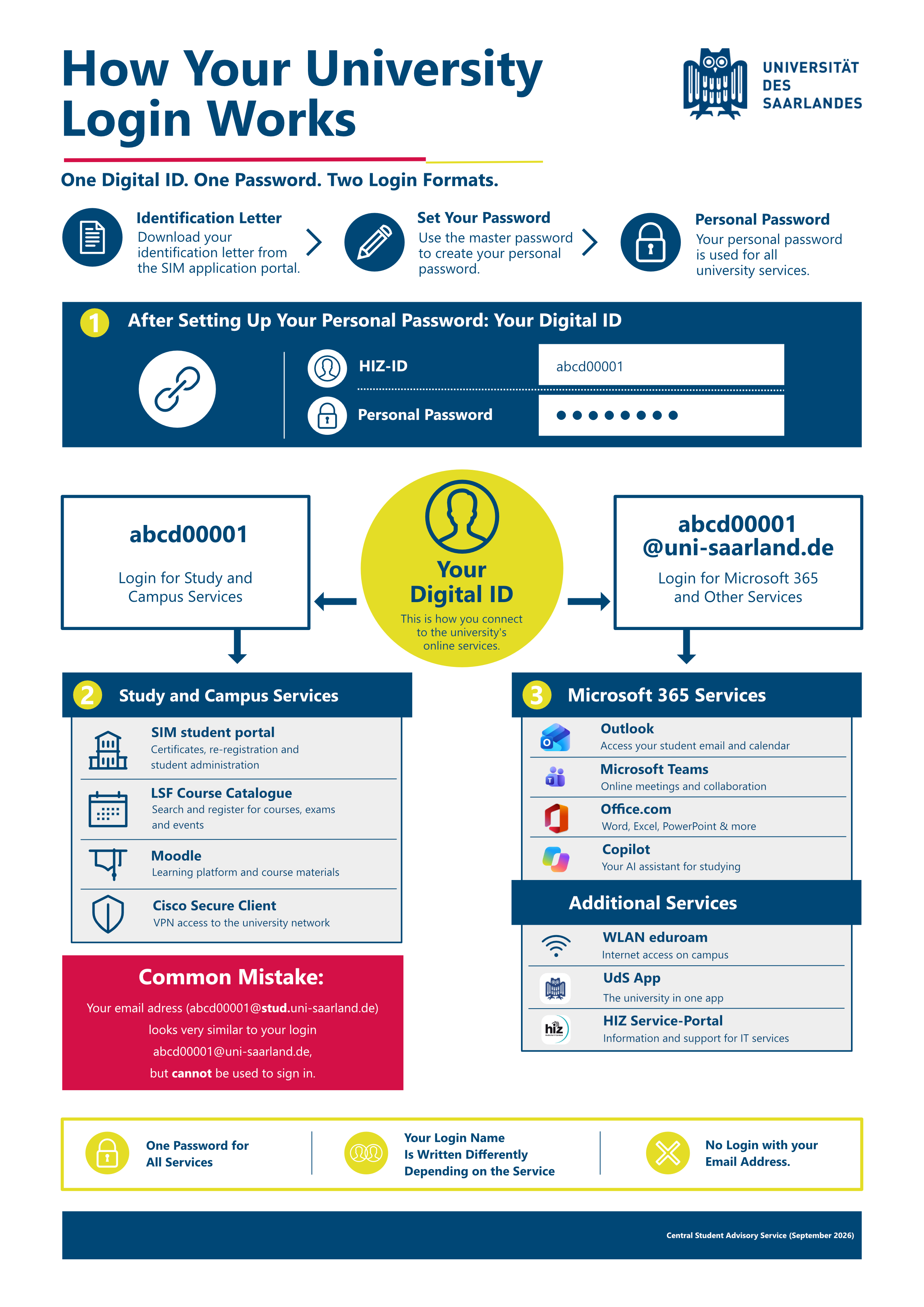
To log in to the university’s various online services, you must first create a personal password using your master password. Technically, this is possible approximately three days after your enrolment has been processed. Make sure you remember this password, as it will be valid for all online services throughout your studies.
With the combination of your HIZ ID and your personal password, you’re all set to use the University of Saarland’s digital services.
There are two login options:
- HIZ ID + personal password
- HIZ-Kennung(at)uni-saarland.de + personal password.
The infographic How your university login works shows you which login is required for which services.
Central Student Advisory Service
Saarbrücken Campus
Building A4 4, Ground floor
Phone: +49 681 302-3513
studienberatung(at)uni-saarland.de
Central Student Advisory Service
